Top YouTube Shorts Downloader Without Watermark Free 2026
Short-form video has changed how people learn, communicate, shop, discover products, and consume entertainment. YouTube Shorts can deliver useful information in less than a minute, which makes them convenient to watch but sometimes difficult to revisit when an internet connection is unavailable. A youtube shorts downloader is one solution people search for when they want to save a Short as a local video file.
However, there is an important distinction between downloading your own content, using YouTube’s official offline features, and obtaining a separate file through a third-party service. YouTube officially supports downloading videos that you have uploaded and offers offline viewing for eligible content in supported circumstances.
This guide explains the different methods, device options, file formats, quality considerations, safety precautions, and copyright questions so readers can choose the most appropriate approach for their situation.
What Does a YouTube Shorts Downloader Do?
A YouTube Shorts downloader is a digital service or application that attempts to turn a YouTube Short URL into a downloadable media file.
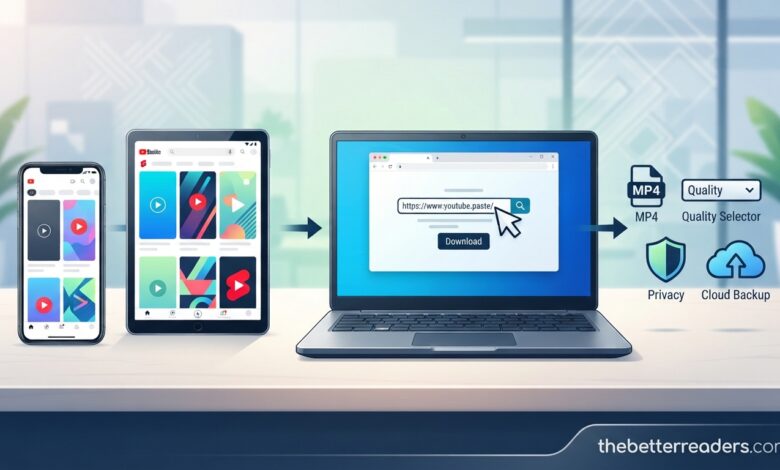
Most browser-based tools follow a simple pattern:
Copy the link → paste the link → select an available option → save the file.
The simplicity is one reason these tools are popular.
But the technical ability to download something should not be confused with permission to use it. YouTube’s copyright guidance explains that original creative works are generally protected by copyright, and rights holders control how their work is used.
Therefore, the first question should not be “Can this Short be downloaded?” It should be “Am I authorized to download and use this Short for my intended purpose?”
Three Different Ways to Save a Short
People often use the word “download” to describe several different actions.
Official Offline Viewing
YouTube may allow eligible videos to be downloaded for offline playback in supported locations. These downloads are managed within YouTube rather than delivered as unrestricted MP4 files.
Downloading Your Own Video
Creators can download videos they have uploaded through YouTube or YouTube Studio. YouTube provides an official process for retrieving those videos, although some content may have download restrictions.
Third-Party File Download
A third-party youtube shorts downloader may attempt to create a local video file from a publicly accessible URL.
This can be useful for content the user owns or has permission to download, but the user should evaluate the tool’s security and the content’s usage rights.
How to Download Your Own Shorts
If you created the Short yourself, the official route is usually the simplest.
On Android, YouTube’s help documentation says creators can open their profile, access their videos, select the Shorts tab, and use the menu to save a video to the device. The YouTube Studio app provides a similar route through the Content section.
On a computer, creators can sign in to YouTube Studio, open Content, choose the relevant video, and select the download option.
This method has a major advantage: it avoids relying on an unknown third-party website.
However, YouTube lists situations where a creator may be unable to download a video. These can include certain copyright or Community Guidelines restrictions and some videos using pre-approved audio.
How to Use a YouTube Shorts Downloader Online
If you have a legitimate reason to obtain a separate video file, a browser-based service may be convenient.
Find the Short
Open the YouTube Short you want to save.
Copy Its URL
Use the Share button and copy the link. Keep the original link in case you need to return to the source.
Open the Downloader
Use a reputable service through your browser. You should not need to provide your YouTube login credentials.
Paste the URL
Place the Short’s link into the service’s input field.
Review Available Formats
A service may display MP4 resolutions or other options. Select an appropriate quality rather than automatically choosing the largest file.
Download the File
Save the output to the device. Afterward, verify the file before opening or moving it into another application.
This workflow is common, but individual services may behave differently.
Downloading YouTube Shorts on Android
Android provides considerable flexibility for downloaded media.
A browser-based downloader can generally be accessed without installing a separate application. Once a file has been saved, users can locate it through the Downloads folder or file manager.
This is useful when a creator wants to transfer an authorized video into an editing application.
However, Android users should be especially careful with APK files. A website that says a downloader “requires” an unknown APK should be treated cautiously.
A browser-based tool should not require access to your contacts, messages, Google account, or unrelated device information simply to process a public video URL.
Downloading YouTube Shorts on iPhone
iPhone users can also use supported browser-based services for authorized downloads, although file management works differently from many Android devices.
Downloaded files commonly appear in the Files application. From there, a user may be able to move or share the file with compatible applications.
For offline viewing, YouTube’s own iOS options can be more straightforward. YouTube says Premium users can watch previously downloaded videos through the YouTube application, while eligible users in supported locations may also have access to offline downloads.
Downloading Shorts on a PC or Mac
Desktop users may prefer browser-based tools because a large screen makes URL management and file organization easier.
The basic workflow remains the same: copy the Short’s URL, open a suitable service, paste the link, select the output, and save the file.
YouTube Premium also supports offline downloads on supported desktop browsers. YouTube currently lists Chrome, Edge, Firefox, and Opera among supported browsers for Premium downloads.
The distinction remains important: an official YouTube offline download is intended for playback within YouTube, while a third-party downloader may produce a separate media file.
Why MP4 Is Commonly Used
When people search for a YouTube Shorts MP4 download, they are usually looking for a video file that can be opened by common devices and software.
MP4 is widely supported, which makes it convenient for:
- Mobile playback
- Desktop viewing
- Video editing
- Personal archives
- Authorized social media workflows
- Backup copies of personal content
However, MP4 is only a container format. It does not tell you whether the content is copyrighted, licensed, or legally reusable.
Understanding Video Resolution
Downloaders may offer several quality levels.
A lower resolution creates a smaller file and may be perfectly adequate for quick reference. Higher resolution is generally preferable when the video is going into an editing workflow.
For example, an editor working with their own footage may want the highest available authorized version to avoid unnecessary quality loss during editing.
Storage should also be considered. Saving many high-resolution Shorts can consume significant device space.
A practical strategy is to match quality to purpose rather than always selecting the maximum option.
Can You Download a Short Without a Watermark?
Some third-party tools advertise watermark-free files.
If the video belongs to you, a clean original file can be useful for editing and republishing on platforms where you have the necessary rights.
If the video belongs to another creator, removing a watermark does not remove copyright ownership.
The absence of a watermark should therefore never be treated as permission to repost.
Creators may use watermarks for branding, attribution, or identification. Removing one can also create ethical or contractual issues depending on how the video is later used.
YouTube Shorts Download and Copyright
Copyright is the biggest issue that many downloader articles fail to explain clearly.
YouTube says that when someone creates an original video, they generally own the copyright in that work. Rights holders can decide who may use, reproduce, distribute, or adapt their content.
There are exceptions and licensing systems. YouTube identifies concepts such as permission, Creative Commons, public domain, and copyright exceptions such as fair use or fair dealing.
But these concepts have specific requirements.
For example, simply adding commentary to a downloaded Short does not automatically make its use fair. Rules vary by jurisdiction and circumstances.
If the planned use is commercial, monetized, promotional, or intended for redistribution, obtaining clear permission or an appropriate license is the safer approach.
Can You Reuse a Downloaded Short?
Downloading and reusing are two separate actions.
You may be able to save a file for personal reference while still lacking permission to upload it somewhere else.
Before reusing a Short, ask:
- Who created it?
- Is it licensed for reuse?
- Did the creator give permission?
- Does the video contain third-party music?
- Will the new use be commercial?
- Are you changing the content substantially?
- Does a legal exception actually apply?
If the answer to these questions is unclear, do not assume that downloading gives you reuse rights.
Why Music Makes Shorts More Complicated
A Short may contain music that the creator was permitted to use within YouTube.
That permission does not necessarily mean another person can download the Short and use the same audio in a commercial project elsewhere.
Music licensing can involve separate rights from the video itself.
This is particularly important for marketers, businesses, agencies, and creators who plan to repurpose Shorts across platforms.
Is YouTube Premium Better Than a Downloader?
It depends on the purpose.
If you simply want to watch eligible content without an internet connection, YouTube Premium’s official offline feature can be more appropriate. YouTube explains that Premium members can download supported videos and watch them offline through the service.
If you need a local file of your own uploaded Short, YouTube Studio is the logical choice.
A third-party downloader becomes relevant when you have an authorized reason for obtaining a separate file and the official options do not provide the format or workflow you need.
Common Problems With Online Shorts Downloaders
Several issues can occur when using third-party services.
The Link Is Not Recognized
The service may not support the particular URL format. Try copying the link again rather than typing it manually.
The Download Button Does Nothing
This can result from browser restrictions, temporary server problems, or aggressive advertising scripts.
The Quality Is Lower Than Expected
The downloader cannot create genuine source quality that was never present in the original video.
The File Has No Sound
Some tools process video and audio streams separately. Compatibility issues can result in incomplete output.
The Website Redirects You
Unexpected redirects are a warning sign. Close suspicious pages rather than clicking through unfamiliar prompts.
Safety Checklist for Downloader Websites
A safe workflow should include a few basic precautions.
Never provide your Google password.
A legitimate downloader should not need your YouTube login credentials.
Avoid unnecessary extensions.
A website should not need a random browser extension simply to process a video URL.
Watch for fake buttons.
Some pages use advertisements designed to look like download controls.
Be careful with executable files.
A simple video download should not normally require installing unrelated software.
Keep security software updated.
This adds another layer of protection when handling files from the internet.
What Should Creators Do Instead of Relying on Downloaders?
Creators should keep their original video files.
If you edit Shorts on a phone or computer, maintain a backup of the final export and, when practical, the original project files.
Cloud storage, external drives, or another secure backup can help prevent the loss of important content.
YouTube itself should not be considered the only backup location for your creative work.
Downloading your own Short from YouTube is useful, but maintaining the original file gives you greater control over resolution, audio, captions, and future edits.
How to Organize Downloaded Shorts
If you regularly work with authorized video files, organization can save time.
Use descriptive filenames rather than leaving files with random download names.
For example:
topic-date-platform-version.mp4
You can also create folders for:
- Original footage
- Final Shorts
- Approved downloads
- Client content
- Licensed material
- Archived projects
This becomes especially valuable for agencies and creators managing dozens or hundreds of short-form videos.
Can Downloaded Shorts Be Used for Research?
Yes, provided the way you access and use them is appropriate.
Researchers, marketers, and content strategists may study public Shorts to understand trends, storytelling techniques, editing patterns, hooks, captions, and audience engagement.
In many cases, you do not need to download the video at all. Saving the original URL and studying the content directly may be sufficient.
If you do save copies for research, keep them private and follow applicable copyright and platform rules.
Why You Should Not Trust Every “Free” Downloader
The word “free” does not automatically mean safe.
Some websites monetize through advertising, redirects, aggressive notifications, or bundled software. Others may collect unnecessary information.
Before using a service, look at the overall user experience. If a site asks for excessive permissions, repeatedly opens unrelated pages, or claims that your device is infected, close it.
A simple download should not require complicated access to your personal information.
Official YouTube Guidance on Downloading
YouTube’s own documentation provides the clearest distinction between creator downloads and offline viewing.
Creators can download videos they uploaded through YouTube or YouTube Studio.
For eligible content, YouTube also provides offline viewing features in supported locations. Depending on the account and location, downloads may be available through the mobile application or YouTube Premium.
The downloaded content may have time or availability limitations because YouTube periodically reconnects to check whether the video remains available for offline playback.
This official approach is worth considering before looking for an outside tool.
A Simple Decision Guide
| Your goal | Best starting point |
|---|---|
| Download your own Short | YouTube Studio |
| Watch eligible content offline | YouTube’s download feature |
| Use Premium offline viewing | YouTube Premium |
| Obtain an authorized local MP4 | Appropriate downloader |
| Back up your own content | Original files + YouTube download |
| Study a public Short | Save the URL and review it directly |
This makes the decision much simpler.
Frequently Asked Questions
What is a YouTube Shorts downloader?
It is a tool or service designed to help users save a YouTube Short as a local video file. The legality and appropriate use depend on ownership, permission, licensing, and applicable law.
How do I download YouTube Shorts?
The general process with a third-party service is to copy the Short’s URL, paste it into the downloader, select an available format or quality, and save the file. For your own content, YouTube’s official download option is preferable.
Can I download YouTube Shorts without an app?
Some browser-based services work without installing an app. YouTube also provides official browser and app-based offline options in supported circumstances.
Can I download a Short as MP4?
Some third-party services offer MP4 output. You should only save or use content in ways you are authorized to do.
Can I download my own Shorts?
Yes. YouTube provides official download options for videos you have uploaded, subject to restrictions.
Can I download YouTube Shorts on iPhone?
You can use YouTube’s supported offline features on iPhone, and authorized files may also be downloaded through compatible browser-based tools.
Can I download YouTube Shorts on Android?
Yes. Android users can use YouTube’s supported offline options, and creators can download their own videos through YouTube or YouTube Studio.
Is it legal to download someone else’s YouTube Short?
There is no universal yes-or-no answer. Copyright law, permission, licensing, purpose, and jurisdiction all matter. YouTube states that original creators generally own copyright in their works.
Can I repost a downloaded Short?
Downloading a file does not give you automatic permission to repost it. You generally need permission, a suitable license, or a valid legal exception.
Does YouTube Premium give me an MP4 file?
YouTube Premium’s download feature is designed for offline playback through YouTube rather than providing an unrestricted MP4 file.
Why does a downloader sometimes stop working?
Third-party services can stop working when websites change their systems, URL structures, technical restrictions, or access methods. A tool that worked previously is not guaranteed to work permanently.
Final Thoughts
A youtube shorts downloader can be useful, but the right method depends on what you are trying to accomplish. If you created the Short yourself, YouTube’s official download tools are usually the best starting point. If you simply want offline playback, YouTube’s built-in options can provide a more straightforward solution.
Third-party tools can be convenient when a separate video file is genuinely needed and the user has permission to obtain and use that content. Even then, security deserves attention. Avoid unknown applications, suspicious redirects, unnecessary permissions, and requests for account passwords.
Most importantly, remember that accessibility does not equal ownership. A Short being publicly visible does not automatically make it free to copy, modify, or redistribute. YouTube’s copyright guidance makes this distinction clear. More info read thebetterreaders.com.
The best downloader strategy is therefore not simply about speed or resolution. It is about choosing the right method for the purpose, protecting your device and personal information, and respecting the rights of the people who create the videos you enjoy.